
Keep every corrective action moving
A corrective action kept in a spreadsheet and an email thread stalls, and at the audit it is hard to show what it belonged to. In VisualQMS each one goes to the person responsible with a deadline, linked to the finding behind it.
- An owner and a deadline for each action
- Linked to the finding behind it
- Escalated when a deadline passes

Ready when the auditor asks what you did
Linked to where it started
Link a CAPA to the non conformance, complaint or audit observation behind it, and to the change request and documents that came out of it.
Reminders until it is done
Actions are scheduled and people are reminded. When a deadline passes, the task is escalated.
The same steps every time
Every CAPA follows the workflow you have agreed, and each step goes to the people responsible for it. Each approval, review and verification is a record of its own, with the person's comment and their accept or reject.
Follow one problem from finding to fix
A corrective action keeps its links to where it started and to what it changed.
-
Something is found
A non conformance, a customer complaint or an internal audit observation is recorded in its own module.
-
The action is assigned
A CAPA refers back to the finding, and the workflow sends the actions to the people responsible.
-
The procedure changes
If a controlled document has to change and your rules require it, the change request is approved before anyone edits.
-
The CAPA holds the whole story
The finding, the actions and the revised procedure stay linked to the CAPA, so an auditor's question is answered from one case.
Check where every CAPA stands at a glance
Each CAPA sits in the column for the step it has reached, with its implementor and deadline on the card. The number at the top of a column tells you how many CAPAs are at that step.
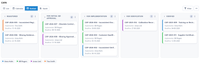
The same CAPAs also open as a list, on a calendar or as a gantt chart, so managers can follow every CAPA and its deadline without asking for a status report.
A CAPA usually starts somewhere else
A CAPA can point back to what started it: a non conformance, a deviation, a recorded issue or an internal audit observation.
When the fix means updating an SOP, document control takes the new version through review and approval, and training management asks the people it covers to acknowledge it.

Questions about CAPA Management
Is CAPA part of the core or an add-on?
Can the workflow follow the corrective-action method we already use?
How do CAPAs stay on time?
Can a record be held back until the information is complete?
What can a CAPA be linked to?
Add the modules your CAPAs connect to
Internal Audit Management
Know where every audit stands, with reminders for the people involved and observations tied to CAPA.
See Internal Audit ManagementIssue Management
Record an issue or a customer complaint, decide how each kind is handled, and keep it tied to the CAPA it leads to.
See Issue ManagementTraining Management
See who has read the new procedure. Assign training by role, department or any other employee detail, and the manager hears when it is overdue.
See Training ManagementChange Management
Change requests that say what changes and why, approved before a controlled document is edited.
See Change ManagementDeviation Management
Deviations handled the same way each time, and linked to CAPA.
See Deviation ManagementNon Conformance Management
Non conformances recorded in their own module, taken from registration to review and approval, and linked to the CAPAs that fix them.
See Non Conformance ManagementRisk Management
Risk assessments that follow your own method and stay linked to the CAPAs, changes and documents they concern.
See Risk Management