
Take every non conformance to approval
A non conformance noted in an email is easily lost before anyone has found the cause. In VisualQMS it has its own module, where each step goes to the person responsible and the CAPAs that fix it are linked.
- Its own record from the start
- Each step has an owner
- Linked to its CAPAs

Every non conformance lands with someone who acts on it
Its own record
Each non conformance is recorded in the Non Conformance module and listed in its view, with the CAPAs linked to it right beneath it.
The right person
Each step goes to the designated people, with scheduling, reminders and notifications. A task that runs late is escalated.
What is still open
The quality activity modules give you an overview of the work under way, so you see which non conformances are still open.
Show which CAPAs each non conformance led to
Every add-on module is cross-referenced to the others. A non conformance can be linked to its CAPAs, to a customer complaint behind it and to the procedure it concerns, and each CAPA points back to it.
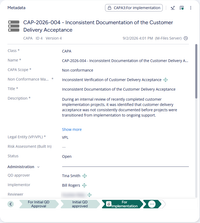
A CAPA raised from a non conformance names it
A CAPA raised from a non conformance shows the non conformance behind it, who approves the CAPA, who carries it out and the step it has reached.
- Each of its CAPAs is reachable from the non conformance.
- Each step goes to the person named for it.
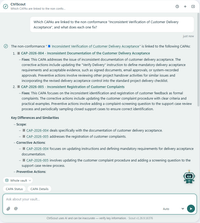
Ask what each CAPA fixes
Ask the AI assistant which CAPAs belong to a non conformance, and it lists them, says what each one fixes and links to the records.
- It reads only what the person asking may see.
- Each CAPA in the answer opens its record.
From the first report to the approved close
A non conformance runs through workflow states such as these. The states, and the people who act in each one, are set up to match how you work.
-
Registration
Record what was found, with the details the workflow asks for.
-
Investigation
Look into what caused the non conformance.
-
Closure
Close the non conformance once the follow-up is done.
-
Reviewed and approved
The designated people review and approve the closed non conformance, with its CAPAs linked to it.
Questions about Non Conformance Management
Is Non Conformance Management a core module or an add-on?
It is an add-on module that you can add at the start or later, and you don't have to use every module. Controlled documents and the process maps usually come first.
How is it different from Deviation Management?
Non conformances and deviations each have their own module and their own records. Both are cross-referenced to CAPA, so a corrective action can reference a non conformance or a deviation.
Can the workflow follow the method we already use?
Yes. The module is pre-configured, and set up for your organisation during implementation. It can also be configured further, or from scratch, so the states and the people in them follow your method.
Can a non conformance be held back until the information is complete?
Yes. The workflow can make certain fields mandatory in a given state, so a non conformance moves on only once they are filled in.
What can a non conformance be linked to?
The add-on modules are fully cross-referenced to the other modules. A non conformance can be linked to its CAPAs, to the customer complaint behind it and to the procedure it concerns.
Link each non conformance to the rest of your QMS
Internal Audit Management
Know where every audit stands, with reminders for the people involved and observations tied to CAPA.
See Internal Audit ManagementIssue Management
Record an issue or a customer complaint, decide how each kind is handled, and keep it tied to the CAPA it leads to.
See Issue ManagementCAPA Management
Corrective and preventive actions with a person responsible and a deadline, linked to the finding that started them.
See CAPA ManagementTraining Management
See who has read the new procedure. Assign training by role, department or any other employee detail, and the manager hears when it is overdue.
See Training ManagementChange Management
Change requests that say what changes and why, approved before a controlled document is edited.
See Change ManagementDeviation Management
Deviations handled the same way each time, and linked to CAPA.
See Deviation ManagementRisk Management
Risk assessments that follow your own method and stay linked to the CAPAs, changes and documents they concern.
See Risk Management