
Approve the change before anyone edits
A colleague asks for a wording change in the corridor, and the reason is never written down. In VisualQMS the request is a record, and where your rules require it, the document opens for editing only once it is approved.
- The reason is written down
- Approved before editing
- Every version kept

From a request to the version people use
The request and the document it changes stay linked all the way.
-
Someone asks for a change
The request says what has to change and why, and points to the documents, risks or CAPAs it concerns.
-
The request is approved
Your approvers
Where the rules require an approved change request, editing waits until then.
-
The document is edited
Authors and reviewers
Authorised people click edit and work in Word, Excel or PowerPoint, and each reviewer gets a review record to complete.
-
The new version is published
The approved version becomes the one ordinary users see, and the earlier version stays in the history.
Know why a procedure changed
Linked to what it affects
A change request points to the documents it affects and to the risk assessment, CAPA or non conformance behind it.
The old version is kept
The previous version stays in the history, and every change is logged.
People hear about the new version
A training rule asks the people it covers to acknowledge the published version.
Spot the changes still waiting for approval
Each column is a step in the workflow, and every card carries the request's process owner and due date. Requests waiting for review and those waiting for approval have columns of their own, each with a count at the top.
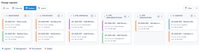
Switch to a list, a calendar or a gantt chart to see the same requests another way, so everyone involved in a change can see how far it has got.
The approved version is the one people open
Change requests and document control work as a pair. The request records why a document changes, and the revised version is reviewed and approved before it is published. A request can also point to the risk assessment or CAPA behind it.
When the new version is published, training management asks the people it covers to acknowledge it. With the process maps, every activity that links to the procedure opens the new version from then on, and the map doesn't need to be republished.

Questions about Change Management
How is this different from tracking changes in a spreadsheet?
A spreadsheet records that a change was discussed. In VisualQMS, a change request is a record with its own workflow, and where your rules require it, the controlled document can't be edited until the request is approved. The new version then runs through review and approval, and the earlier version stays in the version history.
Is Change Requests part of the core or an add-on?
Change Requests is one of the add-on modules. The change request and the controlled document each follow their own workflow, and they stay linked.
Can the approval path differ for different kinds of document?
Yes. Review and approval can include extra steps, parallel or sequential reviews, and rules for whether one approval is enough or all approvers must sign off.
How do we keep a superseded revision out of circulation?
Ordinary users only see the latest published version of a controlled document, and links from the process maps open the latest approved version. Each document appears in every view it matches, with no copies in other folders.
How do changes stay on time?
The quality activity modules use scheduling, reminders and notifications. Each reviewer of a document gets a review record, and an overdue review record is escalated.
Does change management connect to risk and CAPA?
Yes. Change Requests, Risk Assessments and CAPA are add-on modules, and all add-on modules are fully cross-referenced to the other modules, including non conformances and the documents a change affects.
Tie each change to the case behind it
Internal Audit Management
Know where every audit stands, with reminders for the people involved and observations tied to CAPA.
See Internal Audit ManagementIssue Management
Record an issue or a customer complaint, decide how each kind is handled, and keep it tied to the CAPA it leads to.
See Issue ManagementCAPA Management
Corrective and preventive actions with a person responsible and a deadline, linked to the finding that started them.
See CAPA ManagementTraining Management
See who has read the new procedure. Assign training by role, department or any other employee detail, and the manager hears when it is overdue.
See Training ManagementDeviation Management
Deviations handled the same way each time, and linked to CAPA.
See Deviation ManagementNon Conformance Management
Non conformances recorded in their own module, taken from registration to review and approval, and linked to the CAPAs that fix them.
See Non Conformance ManagementRisk Management
Risk assessments that follow your own method and stay linked to the CAPAs, changes and documents they concern.
See Risk Management