
Know where every audit stands
The audit programme lives in a spreadsheet, and it takes a meeting to find out which audits have slipped. In VisualQMS you see where every audit stands, and each observation that needs action is tied to its CAPA.
- Every audit by status
- Reminders to the people involved
- Observations tied to CAPA

The audit programme moves out of the spreadsheet
A year plan can show every audit on one timeline, coloured by status: completed, ongoing or planned. A line marks today, so you see how far the programme has come without calling a meeting.
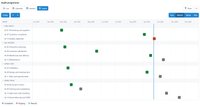
Each row is an audit, placed in its month, so the whole programme fits on one screen.
- Every audit of the year on one timeline
- Completed, ongoing and planned at a glance
- The same audits as a list, a calendar or a board
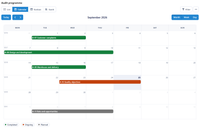
The same audits on a month calendar with week numbers: what is under way and what comes next. The audit's workflow sends reminders and notifications to the people involved.
Follow an observation through to the CAPA
Each observation stays tied to the audit it came from and to the action it led to.
-
Plan the audit
Put the audit in the year's programme, and reminders and notifications go to the people involved.
-
Carry it out
Auditors
While the audit is ongoing, its related information and events are kept with it.
-
Record what you find
Each observation is recorded on its own and linked to the audit.
-
Follow up in CAPA
Where an observation needs corrective action, the CAPA refers back to it.
Questions about internal audits
What is internal audit software, and how is it different from a spreadsheet?
Internal audit software keeps audits, observations and follow-up actions as linked records, so you see where each audit stands and what came of it.
Can we see the audit year as a plan?
A year plan can lay out the year's audits on a timeline by status, on a month calendar or as a list.
Is internal audit part of the core system?
No. Audit Management and Internal Audit Observations are add-on modules, fully cross-referenced to the other modules. You are not required to use all modules, and you can add them at the start or later.
How do observations become corrective actions?
Both are add-on modules, fully cross-referenced to the other modules, so a CAPA can reference the observation that led to it.
Will auditors reference the current version of a procedure?
Yes. Ordinary users only see the latest published version of a controlled document, and links from the process maps open the latest approved version. Changes are always logged, and earlier versions stay in the version history.
Can we see which requirements an audit covers?
Yes. In the Compliance view, the internal audits linked to a requirement are listed under it, with its guiding documents and process activities.
Is VisualQMS certified, or does it make us compliant?
An accredited certification body certifies your organisation's quality management system. VisualQMS keeps the controlled documents, records and workflows you show at the audit.
Carry audit findings into the rest of your QMS
Issue Management
Record an issue or a customer complaint, decide how each kind is handled, and keep it tied to the CAPA it leads to.
See Issue ManagementCAPA Management
Corrective and preventive actions with a person responsible and a deadline, linked to the finding that started them.
See CAPA ManagementTraining Management
See who has read the new procedure. Assign training by role, department or any other employee detail, and the manager hears when it is overdue.
See Training ManagementChange Management
Change requests that say what changes and why, approved before a controlled document is edited.
See Change ManagementDeviation Management
Deviations handled the same way each time, and linked to CAPA.
See Deviation ManagementNon Conformance Management
Non conformances recorded in their own module, taken from registration to review and approval, and linked to the CAPAs that fix them.
See Non Conformance ManagementRisk Management
Risk assessments that follow your own method and stay linked to the CAPAs, changes and documents they concern.
See Risk Management