
Set up a visual QMS in four milestones
The start of our series on building a visual quality management system: the parts it is made of, and the order to set them up in.
In this article
You have been asked to put a quality management system in place, and the first question is what one is made of. This series walks through setting up a visual quality management system: an online manual to your processes that every employee can use, at the level they need, to keep quality and compliance part of the daily work. This first part covers the four milestones and the order they come in.
1. Map your processes#
Draw a visual process map in Elements.cloud, the web tool your diagrams are kept in. Start at the top level of responsibility, then go down into as much detail as each area needs.
Link each step to the content that guides it. People then find everything in one place, whether they come in from the map or from a search.
2. Bring your documents under control#
Set up a library of controlled documents and fill it:
- Decide on the document categories and the other details each document carries.
- Set up the flows for writing and approving content.
- Bring in your vetted documents, and write new ones where you need them.
3. Link your standards to the work#
Build a library of the requirements you work to, such as ISO 9001. The statements usually come as a CSV or similar file you can import, and you can also create them by hand in the VisualQMS web portal.
Then link each statement to the processes and documents that meet it, so you can see how every one of them is covered.
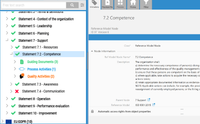
If you have no formal standard to meet yet, leave this part out and add it later.
4. Add the quality activities you need#
Finally, set up the quality activities that keep the work around quality consistent from one case to the next.
Training is usually one of the first. People are reminded of the documents and processes that apply to them, completed training is logged, and missed training is followed up. Training can also be linked to an external training system such as LinkedIn Learning.
Recording issues and handling deviations is often another. What happens after an issue is recorded differs from one kind to the next, so you decide how each kind is handled. Other modules, such as audit management and CAPA, can go in at the start or later, depending on the scope of the project.
The next posts take each milestone in turn, starting with drawing a process map your team can read.
If you are still choosing a system, our help while you find and select a QMS is free of charge. Book a demo and see a process map with its documents and requirements linked, or write to sales@solutionmanagement.eu and we answer the same working day.