
What goes into a visual QMS
A visual QMS lets everyone see the quality system from the angle that suits their job. Here are the parts it is made of, and how to start.

In this article
The idea behind a visual QMS is to let everyone see what they need, in a way that makes sense from where they sit. One person wants to see the quality system as processes: what happens, in what order, and who does it. Another prefers the compliance angle, starting from the ISO and other requirements and how the company meets them. Someone else just wants to search for a document and still see the processes and requirements it belongs to.
For what VisualQMS is today, see What is VisualQMS.
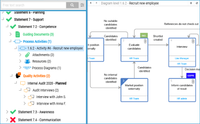
Four parts that link to each other#
Setting up a visual QMS comes down to four parts:
- Draw your processes as a map people can click through.
- Import your requirements, such as ISO 9001, into a requirement library.
- Build a library of guiding documents, with the details people need to find information fast, and approval flows that let the organisation publish new content easily.
- Add the quality activities you need, such as training, issue and deviation handling, and internal audits.
Start with what hurts most#
How big the project is depends on your goals and your existing documentation. You can put a full quality management system in place in the first project, with modules such as risk management and customer feedback, or start with a smaller scope and add modules as you go.
If the basics are enough for now, the first project covers the process map and the controlled documents, with your requirements linked to both.
The Getting started series goes through a typical implementation step by step, starting with the four milestones.
See which QMS modules you would use, or book a demo and see the same quality system from each of these angles. Write to sales@solutionmanagement.eu with your questions, and we answer the same working day.